
Download Web Clipboard by Google – Text Management, Productivity, Web Tool
Overview
Web Clipboard by Google is a lightweight utility designed to streamline text handling across web-based tasks. The app serves as a digital clipboard extension, enabling users to store and retrieve multiple text snippets with minimal effort. It addresses a common challenge in online workflows: the limitation of the standard clipboard, which typically holds only one piece of content at a time. By expanding this capacity, the tool helps users manage research notes, code fragments, email drafts, and other textual content more efficiently.
Target users include students, researchers, content creators, developers, and professionals who frequently copy and paste information from various websites. The app integrates directly into the browser environment, making it accessible during routine web browsing, writing, or coding sessions. Its purpose is not to replace existing text editors but to enhance the workflow between different online sources and applications.
Although the developer did not provide additional technical details about the development team or history, the app’s long-standing presence since its release on November 16, 2010, suggests reliability and consistent functionality over time. It remains relevant in the digital productivity ecosystem by offering a simple yet effective solution for text persistence across sessions. The tool’s importance lies in reducing cognitive load and repetitive actions, allowing users to focus on higher-level tasks rather than managing temporary text storage.
Key Features & Functionality
- Unlimited Text Storage: Unlike the standard clipboard, Web Clipboard allows users to save an unlimited number of text snippets. This enables continuous accumulation of content without overwriting previous entries, ideal for long-term research or multi-source compilation.
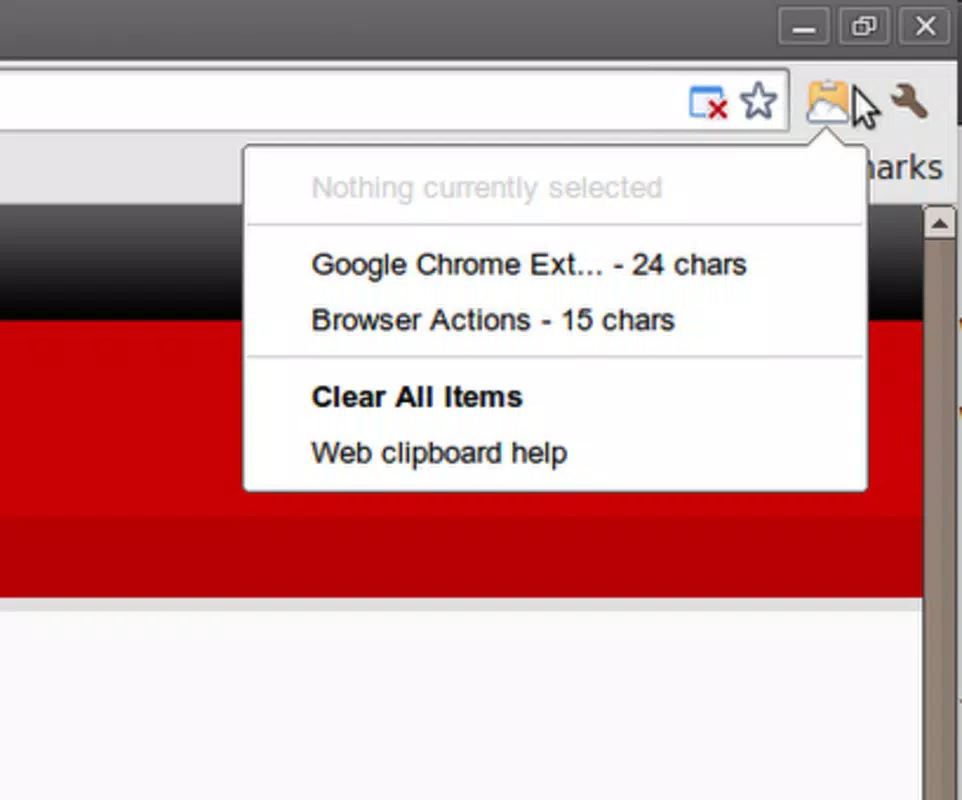
- One-Click Access: After selecting and copying text from a webpage, users can access all stored snippets instantly by clicking the extension icon in the browser bar. This eliminates the need for keyboard shortcuts or manual search, streamlining retrieval.
- HTML and Plain Text Support: The tool preserves formatting when copying HTML content, such as styled text from emails or web articles. It also supports plain text, ensuring compatibility with applications that require unformatted input.
- Seamless Browser Integration: Web Clipboard operates directly within the browser environment, requiring no additional setup or context switching. It works across tabs and sessions, maintaining stored content until manually cleared.
- Effortless Workflow Enhancement: By removing the friction of repeated copy-paste actions, the app reduces task-switching and increases focus. For example, a writer compiling quotes from multiple articles can copy each one and access them later without losing prior entries.
Interface, UX & Performance
The user interface of Web Clipboard by Google is intentionally minimal and unobtrusive. The extension icon appears in the browser’s address bar, and clicking it reveals a compact list of saved text snippets. The layout prioritizes clarity and speed, with each entry displayed in a clean, readable format. Navigation is straightforward—users can scroll through entries or search by keyword if supported.
Visual design aligns with Google’s consistent aesthetic: simple, functional, and distraction-free. The absence of complex menus or settings ensures that even users with limited technical experience can operate the tool effectively. The app responds instantly to user input, with minimal lag during selection, storage, and retrieval of content.
Although the developer did not list formal performance metrics, the app’s lightweight nature suggests it operates efficiently across a range of devices. It does not appear to consume significant system resources, which contributes to stable performance during extended use. The stability of the extension is further supported by its long-standing availability since 2010, indicating consistent reliability across browser updates and system changes.
Platform Compatibility & Technical Requirements
Web Clipboard by Google is designed for use as a browser extension, primarily on desktop platforms. The developer did not specify the exact operating system or minimum OS version required for installation. Compatibility with mobile browsers was not disclosed, and no information was provided about file size or installation package format.
Users should note that the app functions within the browser environment, meaning it is not a standalone mobile application. Its performance and features are dependent on the host browser and its extension support. The developer did not list specific technical requirements, such as RAM or storage needs, nor did they provide details about supported browsers beyond general compatibility.
Pros and Cons
Pros
- Efficiently manages multiple text snippets without overwriting previous entries
- Offers quick access via a single click on the browser icon
- Supports both HTML and plain text formats for versatile use
- Minimalist design ensures low distraction and easy navigation
- Stable performance with no reported resource-heavy behavior
Cons
- Not available as a standalone mobile app; limited to desktop browser use
- Developer did not provide detailed system requirements or compatibility info
- No built-in search or filtering for large sets of saved snippets
- Functionality is limited to text; does not support images or files
- Long-term storage relies on browser session persistence, which may vary
FAQ
Is Web Clipboard by Google free to use?
Yes, the extension is available at no cost. It does not require a subscription or in-app purchases.
Can I use Web Clipboard on mobile devices?
The developer did not specify mobile compatibility. The tool is designed as a browser extension, primarily intended for desktop use.
Does Web Clipboard store data locally?
Yes, text snippets are stored locally within the browser’s extension storage. Data is not transmitted to external servers unless explicitly enabled by the user.
How many text items can I save?
The app allows users to save an unlimited number of text snippets, subject to available browser storage space.
Is Web Clipboard secure?
As a browser extension, it operates within the browser’s security model. Since no external data transmission is confirmed, it is considered secure for personal use. Users are advised to review permissions during installation.
Final Thoughts
Web Clipboard by Google remains a valuable tool for anyone managing text across multiple web sources. Its ability to retain multiple entries, support various text formats, and integrate seamlessly into daily workflows makes it a practical addition to any digital toolkit. While it lacks advanced features like search or file support, its simplicity is its strength—offering reliable performance without complexity.
Users who frequently copy and paste content from articles, emails, or code will benefit most from this utility. It enhances productivity by reducing friction in text management, allowing for a smoother, more focused workflow. Despite its age, the app continues to deliver consistent value with minimal overhead.
Download Web Clipboard by Google now to simplify your online text handling and boost your digital efficiency.


